MATCH_RECOGNIZE: A better way to detect patterns in your data
Dinko Barković, SENIOR CONSULTANT, DATA & ANALYTICS
17 March 2026

This blog will show you how to transform lengthy, complex queries into just a few lines of elegant pattern SQL using MATCH_RECOGNIZE – all in just five minutes.
Why do we continue to fight our data?
Have you ever tried to find a pattern in your data, like gaps in billing periods, spot missing transactions in a time series, or find duplicates breaking your data quality rules
and ended up buried under LAG, LEAD, or dozens of SQL subqueries?
Oracle SQL’s MATCH_RECOGNIZE changes the game.
It’s like putting a regular expression engine on your rows — letting you find complex patterns over sequences of data, just as easily as you’d search for a string with REGEXP_LIKE.
What is pattern matching?
MATCH_RECOGNIZE transforms what would typically be a complex combination of LAG, LEAD, and nested conditions into a concise, declarative, high-level pattern match.
It’s one of the super cool features in Oracle SQL, especially for data warehouses or time-series pipelines, where analyzing sequences is critical. Instead of forcing you to think like a machine (row by row), it lets you describe your intent, and Oracle figures out how to scan for it.
From hunting rows to describing patterns
Think of MATCH_RECOGNIZE as a way of instructing the database: “Scan through my ordered rows, and whenever you detect gaps in date ranges, indicating that billing periods may have been accidentally skipped, capture and label them for me.”
This approach generates a single declarative SQL statement, eliminating the need for PL/SQL loops or deeply nested SQL analytics.
Why use it?
Because traditional SQL is row-oriented, it’s fantastic at asking, “What’s in this row?”
However, it struggles to ask, “What happened across these five rows together?”
MATCH_RECOGNIZE lets your database do the heavy lifting, tracking state across rows and returning groups that exactly match your business pattern or problem.
Stop telling SQL how to row-hop — tell it what pattern to find.
With MATCH_RECOGNIZE:
Core building blocks
Think of MATCH_RECOGNIZE as regex for tables: it gives you building blocks to partition, order, define patterns, and extract exactly the sequences you care about. It is an extension to the SELECT statement that lets you:
☰ PARTITION BY specifies that the rows of the input table are to be partitioned by one or more columns.
↕️ ORDER BY Order your data by time or any sequence column.
🧩 PATTERN regex-like pattern over rows (e.g., UP+GAP).
📝 DEFINE This is where you specify or describe what each letter in the 🧩PATTERN block represents.
UP might mean price > previous_price.
GAP might mean billing_period_start > last_end + 1
📊 MEASURES defines a list of columns for the pattern output table. This part extracts values from matched rows
🔄 AFTER MATCH SKIP control what happens after each match (skip to the next row, to the last row, etc). The options are as follows:
TO NEXT ROW Resume pattern matching at the row after the first row of the current match.
PAST LAST ROW Resume pattern matching at the next row after the last row of the current match.
TO FIRST [var] Resume pattern matching at the first row that is mapped to the pattern variable.
TO LAST [var]Resume pattern matching at the last row that is mapped to the pattern variable.
Example 1.
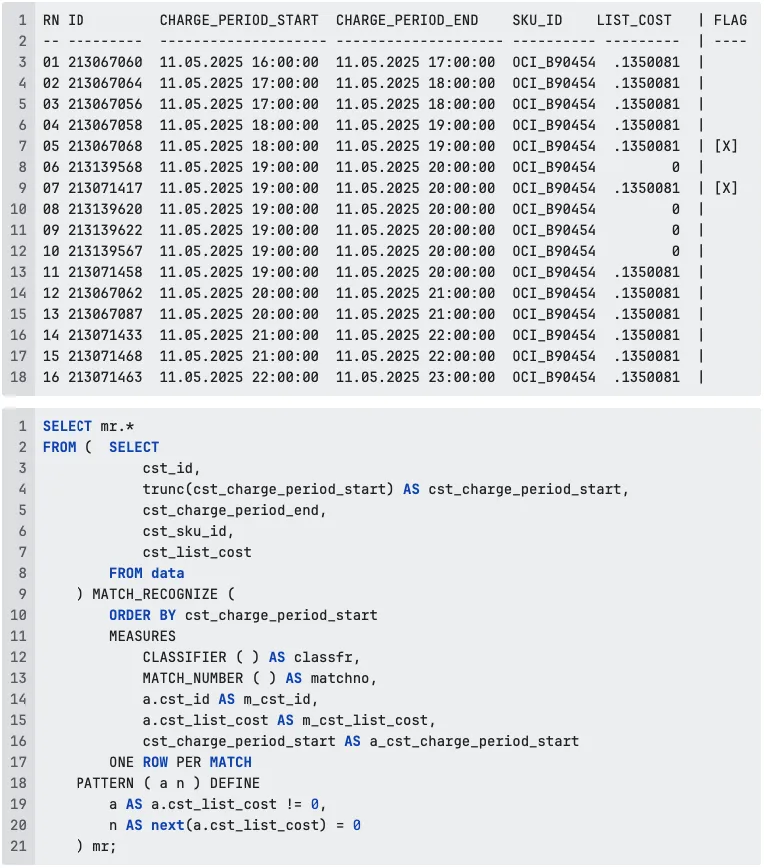
Imagine you have this time-series dataset from your database, and want to get rows marked with flag [x]:
Let’s look at a practical, head-on example that almost every data engineer in billing, finance, or data quality eventually hits: tracking when your list prices unexpectedly drop to zero.
Imagine you have this time-series dataset from your database, and want to get rows marked with flag [x]:
A common billing nightmare, solved in a few lines
Query pulls your dataset with cst_id (transaction id), cst_charge_period_start (period start date, truncated to day), and cst_list_cost (your list price).
The ORDER BY cst_charge_period_start in the MATCH_RECOGNIZE clause instructs Oracle to treat this as a time series, scanning forward day by day; note that the date is truncated (line 4) to achieve the desired result.
PATTERN ( a n ) => a – means: any row where the cost is not zero, n – means: the next row after that must have cost exactly zero. This is like saying, “Find me every time the price was normal, and then immediately went to zero.”
DEFINE defines what these symbols mean: a – AS a.cst_list_cost != 0, n – AS next(a.cst_list_cost) = 0
Notice it uses next(a.cst_list_cost), so n explicitly checks the next cost value after a.
MEASURES pick out exactly what details you want from the matched pattern: CLASSIFIER() tells you whether the row was a or n. MATCH_NUMBER() assigns a group number to each found pattern.
You can pull columns like a.cst_id or the cst_charge_period_start.
ONE ROW PER MATCH, get only one row per found pattern. So even though the pattern covers two rows (a nonzero followed by a zero), the output returns only one summary row per match.
You could switch to ALL ROWS PER MATCH if you wanted the full details.

Example 2.
Imagine you’re monitoring daily cloud costs in your tenancy. Most days are predictable. Compute, Storage, Networking — steady and within expected ranges. Sometimes costs drop because workloads scale down. And occasionally, they spike again when systems scale back up.
The business question becomes: “Can we detect when a specific OCI service category suddenly drops in cost, and then quickly rebounds?”
This is not about total monthly spend. It’s about behavioral patterns inside your cost data. For example, costs decrease for one day, then they increase for at least three consecutive days:
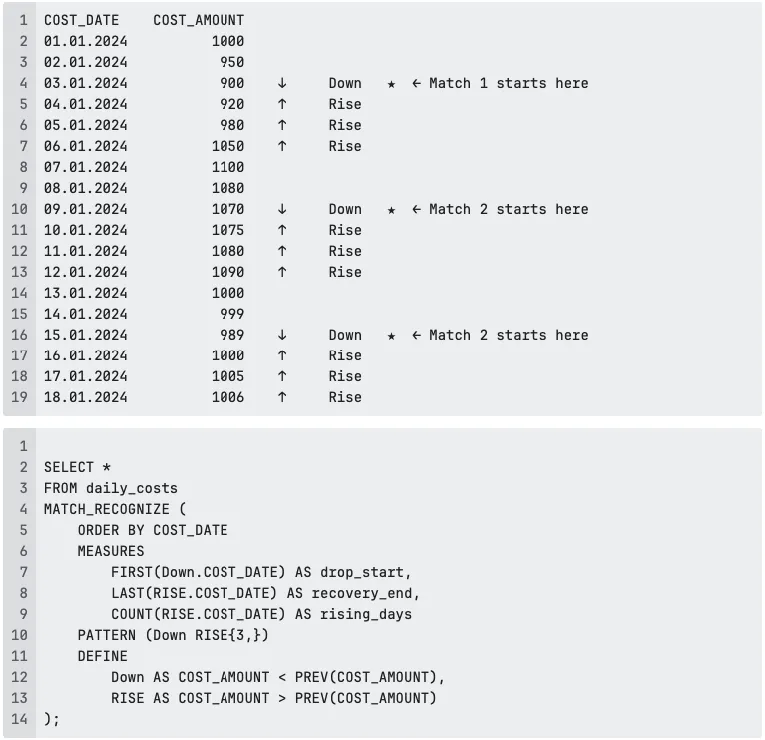
Notice how the “★” marks line up with the SQL pattern: each match starts at the single day of cost drop, and MATCH_RECOGNIZE then looks for at least three consecutive rising days. The query simply asks Oracle: “Show me the start of the drop, the end of the recovery, and how long the rise lasted.” In the query above, MATCH_RECOGNIZE scans the cost data in chronological order (ORDER BY COST_DATE). Each row is evaluated according to the pattern Down RISE{3,}: a single day of decreasing COST_AMOUNT(Down), followed by at least three consecutive days of increasing COST_AMOUNT(RISE).
The MEASURES section picks the first day of the drop (FIRST(Down.COST_DATE)), the last day of the recovery (LAST(RISE.COST_DATE)), and counts how many consecutive rising days there were (COUNT(RISE.COST_DATE)).

Conclusion
Most developers and analysts aren’t chasing patterns just for fun; they’re under pressure to answer tough business questions, to fix messy data, and to deliver insights yesterday.
Traditionally, identifying trends such as gaps, spikes, or sequences involved complex queries with LAG, LEAD, CASE, or recursive CTEs. These solutions work, but they’re hard to read, harder to debug, and nearly impossible to adapt when requirements change.
That’s where MATCH_RECOGNIZE becomes a game-changer. It provides a clean, declarative way to describe patterns in your data, while Oracle handles the mechanics.
You say what the pattern looks like, and Oracle handles the how.
This means fewer bugs, clearer code reviews, and way less fear when your business user says, “What if we also looked for two dips before the spike?”
So next time you’re faced with spotting missing months, sequences of declining sales, prices, or a suspicious series of account logins, don’t bury yourself under window functions and subqueries.
Try MATCH_RECOGNIZE instead.
You’ll not only save time, but you’ll also make your SQL (and your life) a whole lot simpler.
Related articles
MATCH_RECOGNIZE: A better way to detect patterns in your data
March 17, 2026

With a tiered pricing model in the cloud, is it possible to use custom pricing in a multi-tenant setup?
December 11, 2025

Debugging in Oracle SQL sucks – unless you do this
November 13, 2025
%HEADING%
%INTRO%