The turning point in my Python journey: discovering Black, Ruff and mypy
Tea Čutić, Junior Developer
24 June 2026

Five years of college, a solid foundation in Java, and I land my first job as a Junior Software Engineer. Three months in, I get handed a task that needs Airflow, and Airflow means Python. No big deal, right? College had just drilled the fundamentals into me, and I was ready to take on anything. Or so I thought. Turns out, knowing how to program in Java and knowing how to program in Python are two very different things, and that gap showed up in my code fast. As my projects grew, things got messier. Harder to read, harder to maintain, inconsistent in ways I couldn’t quite put my finger on. I was missing all the small, Pythonic habits that separate code that just works from code that’s actually good.
The importance of code quality (and what happens without it)
When you’re new to a language, you’re just trying to get the thing to run. That was me. I didn’t have Python’s best practices down yet, because I’d learned to program in Java, where the language itself keeps you in line. Java’s strictness had been doing a lot of the work for me without my realizing it, so when I moved to Python, I didn’t yet have the habit of doing that work myself. Lesson one: working code and good code are not the same thing.
Python’s flexibility is one of its best features, until it isn’t. If you don’t know what you’re doing yet, that same flexibility turns into a minefield of confusion and inconsistency. Skip the structure and guidelines, and it becomes way too easy to write code that just does the job. This is fine for a quick script. However, it is not fine for a real project with multiple contributors, where “just working” snowballs into bugs that, in hindsight, were completely avoidable.
A lot of that comes down to Python’s dynamic typing. Don’t pay close attention, and you’ll misjudge a value’s type without even realizing it. Python won’t stop you. Since nothing gets checked until the exact line of code actually runs, a type mismatch can sit there, completely invisible, until the one time your code finally hits that path. That’s how you end up staring at a runtime error at 11pm, three layers deep into a debugging session you didn’t sign up for.
Then there’s dead code, the silent clutter of unused imports, unused variables, and code that’s never used. None of it breaks anything; it just sits there, making the codebase bigger and harder to follow. And the more people working on that code, the more time each of them burns trying to understand parts of it that, frankly, don’t even matter.
And don’t even get me started on style. Give it long enough, alone or with a team, and you’ll start spotting the cracks: single quotes here, double quotes there, sometimes tabs and sometimes spaces, line breaks that seem to happen at random. Small stuff, sure, but it adds up. It doesn’t necessarily break your code, but it sure makes it harder to read, turns code review into a slog, and (I promise you this happens) sparks entire meetings dedicated to arguing about whose style is “correct.”
Introducing Black, Ruff, and mypy for Python code quality
Eventually I went looking for guidance and found three tools that made a real difference in how I write Python.
Let’s start with Black, a code formatter built around one simple idea. Stop manually maintaining style and let the tool do it instead. Line length, trailing commas, whitespace, indentation, blank lines? Not your problem anymore. One command, and your whole project falls into line. Black is famously stubborn about configuration, and that’s by design. The entire point is to kill style debates, not give you new ways to have them. You get a little wiggle room (line length, target Python version, which files to skip), but don’t go looking for much more than that.
Next up is Ruff, which fast became my favorite of the three. It can format code too, but where it really shines is as a linter. Without running a single line of your code, it scans it and calls out unused imports, unused variables, dead code and undefined names – the stuff that quietly piles up in a growing codebase and bites you later when you least expect it. By default, it just flags these issues, but it can also resolve a surprising number of them automatically once you ask it to. It can fix anything that is safe to change without affecting what your code does. The trickier issues that have to do with the actual logic in your code still get left for you to handle.
Last but absolutely not least, we have mypy. Here’s the thing about Python: it never makes you declare a variable’s type. Sounds great – one less thing to think about, right? Except now there’s nothing stopping you from quietly assigning the wrong type somewhere. Suddenly you’ve got bugs hiding in plain sight, the kind that can take forever to track down. Mypy reads the type hints you’ve written and makes sure your code actually sticks to them, catching mismatches before anything ever runs. It won’t fix the problem for you; it will just flag it. Since different types usually mean different logic, it’s up to you to figure out the right fix, but knowing exactly where to look gets you most of the way there.
Seeing it in action: a quick before-and-after
The best way to understand the value of these tools is to see them in action. Let’s take a slightly messy Python script and see how each one handles it.
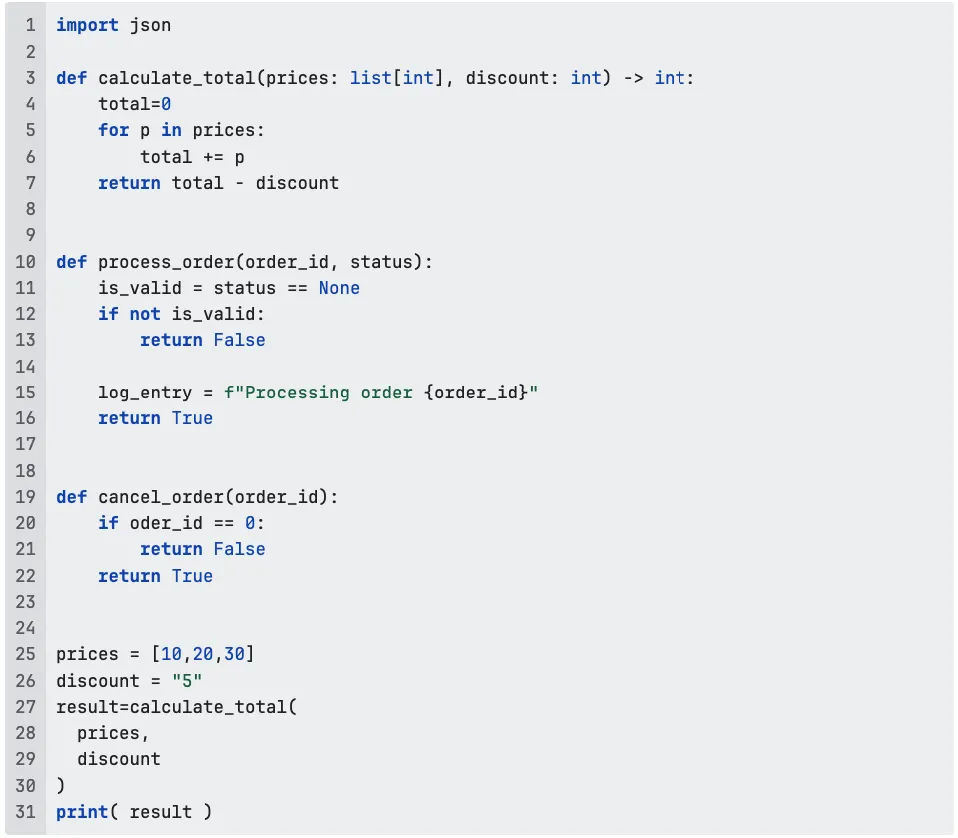
First, Black. Here’s the diff it produces:
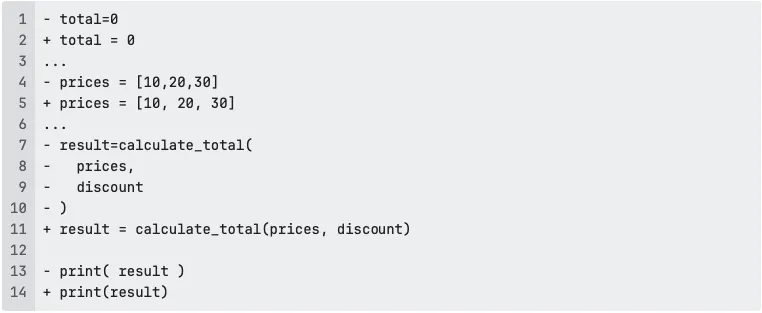
Nothing about the logic changes, Black just collapses that unnecessarily spread-out function call back onto one line, fixes the spacing around =, and tidies up the list formatting. Five minutes of nitpicking handled in one command.
Next up, Ruff. It digs into the code and turns up four separate issues:

An unused import, a comparison that should use is None instead of == None, a variable nobody ever reads, and a typo (oder_id instead of order_id) that would crash the moment cancel_order actually gets called. If we run ruff check --fix, the unused import is cleaned up automatically. Everything else stays flagged and must be reviewed and resolved by a developer.
Finally, mypy. It doesn’t care about formatting or unused anything, it only cares whether the types hold up. For this example, it reports a single error:

The value passed for discount is "5", a string, but calculate_total expects an integer. Nothing about that line looks wrong on a quick read, and Python wouldn’t say a word either, not until the exact moment total - discount actually executes. Mypy catches it before any of that has a chance to happen.
None of the issues in this example are particularly dramatic, but that’s precisely the point. Most bugs aren’t. That’s why these three tools have earned a place in my workflow. They each catch something different, and together they provide a surprisingly effective safety net.
My personal experience: how these tools helped me write better Python code
Coming from Java, Python felt like a breath of fresh air, maybe a little too fresh. Things that were strict rules in Java were suddenly just suggestions, and that’s exactly what got me into trouble early on. Black, Ruff, and mypy didn’t just clean up my code; they taught me how to actually think like a Python developer, without quietly turning my code back into Java with different syntax. Sure, these tools can fix a few things automatically, which is cool and a real time saver, but the real win is what they show you. The habits, the blind spots, the stuff you didn’t know you didn’t know. If you’re early in your Python journey like I was, do yourself a favor and let these tools fill in the gaps your experience hasn’t caught up to yet.
Related articles
The turning point in my Python journey: discovering Black, Ruff and mypy
June 24, 2026

Not all discount-bearing commitments follow the same model
April 21, 2026

MATCH_RECOGNIZE: A better way to detect patterns in your data
March 17, 2026
%HEADING%
%INTRO%